Flex Agent: AI in Excel for audit, explained
Flex Agent is the AI agent inside RobotX Flex. You work with it in the chat, inside your Excel workbook. This piece explains what Flex Agent is, how it fits your Flex workflow, and what to try first.

Flex Agent: AI in Excel for audit, explained
Flex Agent is the AI agent inside RobotX Flex. You work with it in the chat, inside your Excel workbook. This piece explains what Flex Agent is, how it fits your Flex workflow, and what to try first.
Flex Agent: AI in Excel for audit, explained
Flex Agent is the AI agent inside RobotX Flex. You work with it in the chat, inside your Excel workbook. This piece explains what Flex Agent is, how it fits your Flex workflow, and what to try first.

September 16, 2026
Flex Agent is the AI agent inside RobotX Flex. You work with it in the chat, right inside your Excel workbook. Upload your documents and ask a question, or tell it to run Flex's extraction and matching. Whatever it produces stays linked to the source document, ready for review.
Where Flex Agent sits in Flex
RobotX Flex is the audit workspace that helps you build your audit file with a complete evidence trail, all inside Excel. It runs in the workbook your team already uses, on Excel Desktop or Online, and pulls data from the documents you are already working with, whether a PDF, scan, Excel, or Word file.
Draw a box around a value on a PDF and it lands in the sheet, formatted. Point Flex at a population of sampled invoices or transactions and it matches them to their source documents. Click a cell and the source opens to the exact spot the number came from, so every value stays linked to its evidence for review.
Flex Agent is how you now drive that work by conversation instead of by clicking through menus.
Two ways to work with Flex Agent: ask, and act
Flex Agent is one chat, two functions. Ask a question and it answers from what's in your RobotX workspace and your workbook. Give it an instruction and it picks the right Flex tool to run the task. Work with it like a colleague, and it reads which of the two you need.
Asking Flex Agent a question
Upload your documents and ask about anything in your workbook: what is driving a change in an account, whether an invoice matches its purchase order, what is still missing on a sheet, or which documents are uploaded. It reads what is already in the file, points out what it finds, and suggests a next step, like running a specific check or filling a gap.
It also answers the kind of question you would otherwise take to a search engine. Ask for the meaning of a term or background on a client's industry, and it answers from its own training plus what is in the file, without switching tabs. For an associate, that means fewer questions saved up for a manager and more answered on the spot.
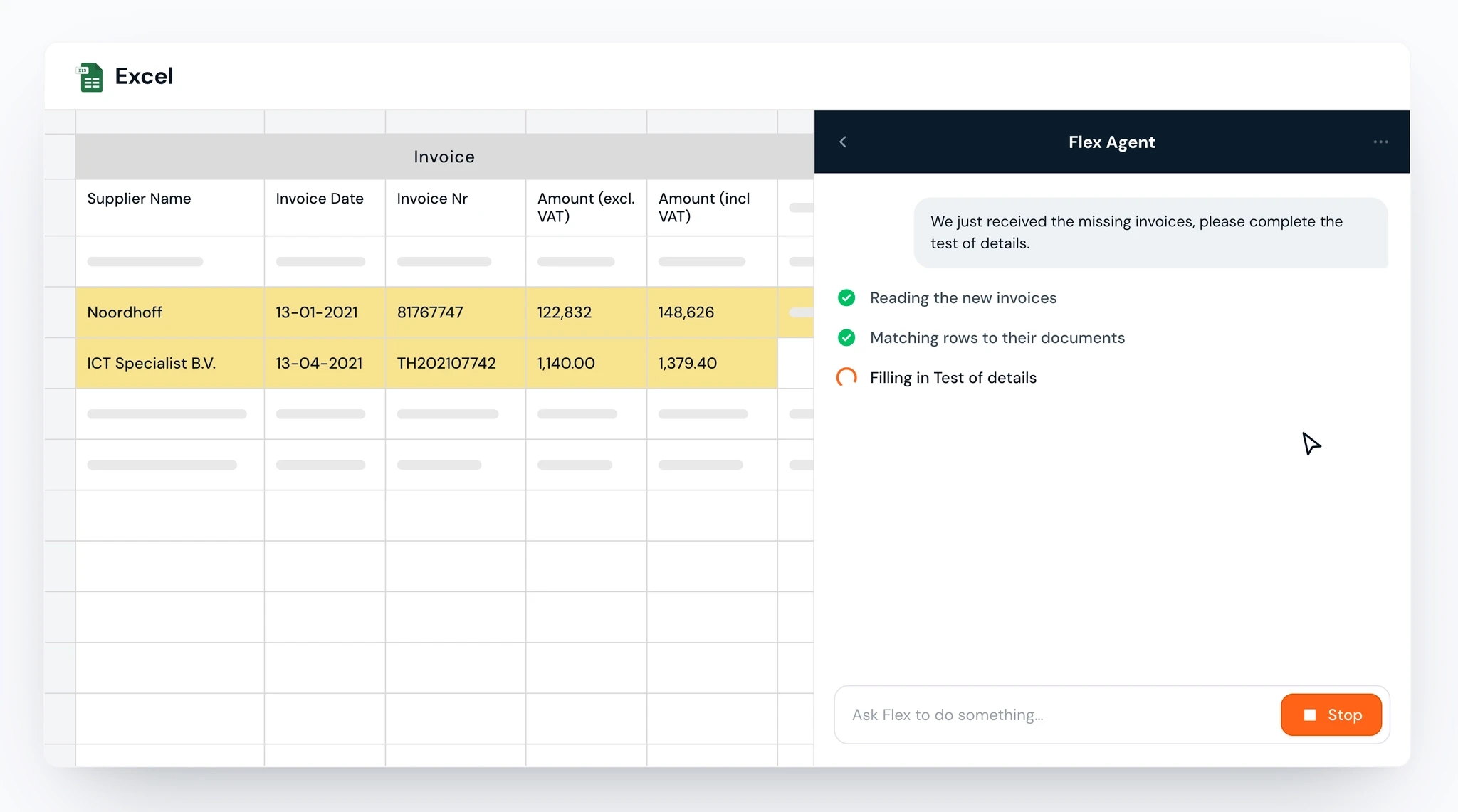
Telling Flex Agent to act
From your instruction, Flex Agent looks at what you have uploaded, works out which steps are possible, and carries out the task using Flex's existing tools, the same tools you would run by hand.
Give it a broad instruction, like "investigate this workbook," and it works out the steps, flags what it finds, and suggests what to do next. Give it a specific one, like "match these ten invoices to their source documents," and it goes straight there. Either way it uses Flex's own tools, without you clicking through the menus to find them.
The difference shows up in volume. Ask it to run a match across a full population and it does the whole batch in one pass, rather than working through it invoice by invoice. Every result stays linked to source and lands ready for review.
What auditors use Flex Agent for
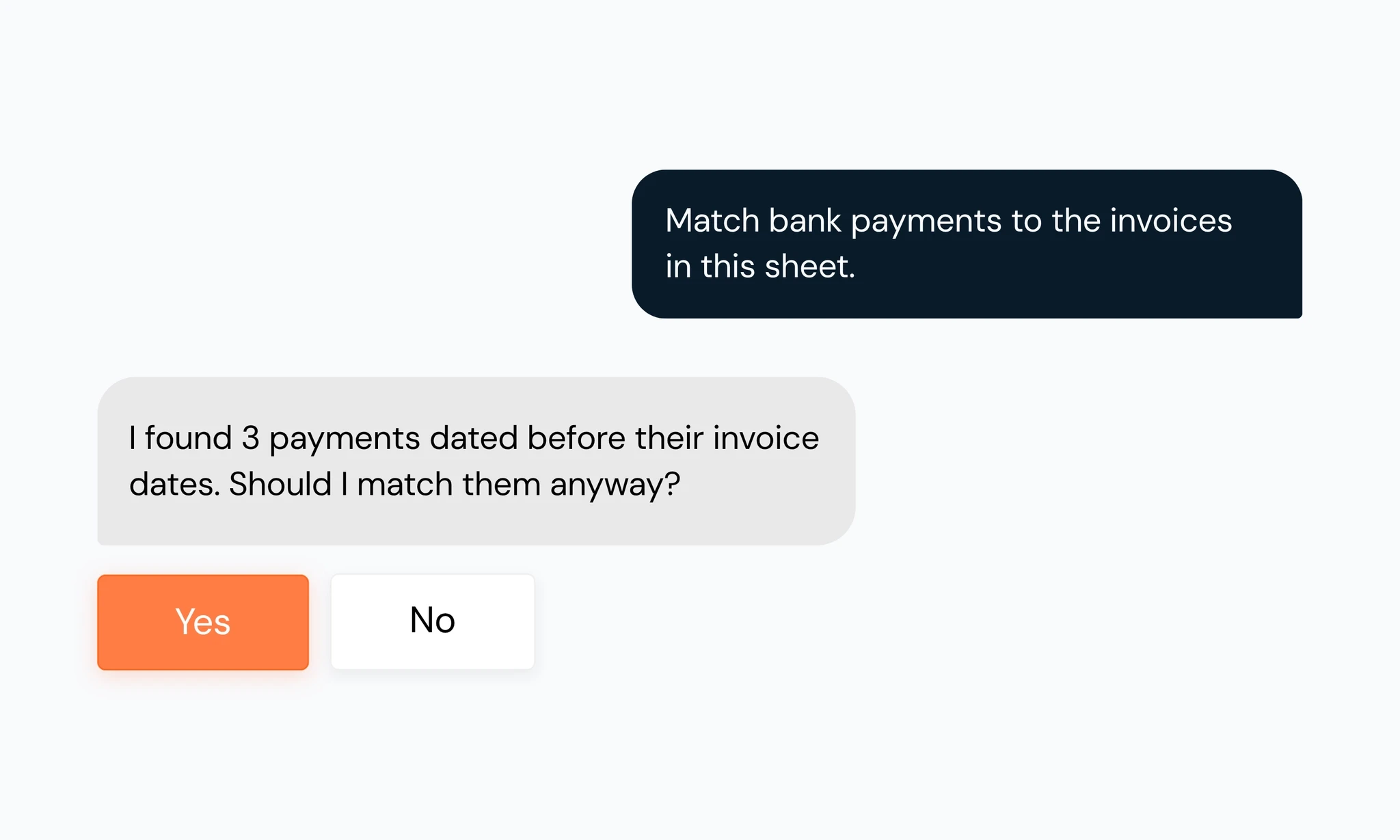
AI journal entry analysis.
Name your risk filters, weekend postings, round-dollar entries over a threshold, unusual account pairings, and Flex Agent applies each across the whole population, linking the supporting document to every entry it flags. You are left with the judgment call.
Extract and match data in volume.
Point it at a population of samples and their documents. It matches each row, extracts the fields, and links every value to its exact spot in the source, running the whole population in one pass.
Investigate a workbook.
Say "investigate this workbook" and it reads the sheet, works out the procedure, and flags what is missing or inconsistent. Useful when you inherit a file and need to know where it stands.
Ask about the engagement.
Ask what is driving a change in an account, or what risks tie to the business. It reads the financials and documents in the file and points you to where to look.
Clean up a workpaper.
Tell it what to fix, finish, translate, or tidy, and it acts on the sheet and the documents underneath, checking with you first if an instruction is unclear.
The auditor reviews before it counts
Before Flex Agent carries out a task, it lays out the steps and waits for you. It flags what it finds and checks with you before overwriting anything already in a cell.
When it finishes, every result stays linked to its source document and is marked in Excel for review, so you are always confirming a match you can trace. Flex Agent handles the execution. The auditor reviews it, and nothing enters the file without that review, the same rule the rest of RobotX runs on.
Getting the best results from Flex Agent
Flex Agent is most reliable on work grounded in your documents: extracting values, matching evidence, and answering questions from what is already in the file. Breaking a bigger task into smaller, defined steps gives more consistent results than asking for everything at once.
It also won't correct a mistake on its own between conversations. If something is off, give it more context and steer it back on track. Every result still goes through your review before it is final, the review principle every RobotX product runs on.
FAQs
What is Flex Agent?
Flex Agent is the AI agent inside RobotX Flex. You work with it by chat in your Excel workbook: ask it about the documents and data in front of you, or tell it to run a task like extraction, matching, or journal entry testing. Every result stays linked to its source for review.
What can Flex Agent do?
It runs real audit work from a plain-language instruction: extract and match data across a full population, test journal entries, build a model, investigate a workbook, find a document, or clean up a sheet. It also answers questions, about the file in front of you or general knowledge like an industry risk. It either does the task or tells you what it is about to do first.
Does Flex Agent replace the auditor's review?
No. Every result it produces is reviewed by the auditor before it enters the file, the same way the rest of RobotX works. Flex Agent does the execution; the judgment stays with the auditor.
How is Flex Agent different from ChatGPT or other AI tools?
A general tool uses one model for everything, so it reasons its way through a financial document the same way it would write an email. Flex Agent picks the right RobotX tool for each step and runs it, built specifically for audit work, so results come back higher quality and linked to source. Everything runs on the infrastructure and review flow your team already uses.
What if Flex Agent gets something wrong?
You can question it, steer it, and correct it in the same conversation until the result is right. And the Flex AI review means nothing enters the file that the auditor is not happy with.
September 16, 2026
Flex Agent is the AI agent inside RobotX Flex. You work with it in the chat, right inside your Excel workbook. Upload your documents and ask a question, or tell it to run Flex's extraction and matching. Whatever it produces stays linked to the source document, ready for review.
Where Flex Agent sits in Flex
RobotX Flex is the audit workspace that helps you build your audit file with a complete evidence trail, all inside Excel. It runs in the workbook your team already uses, on Excel Desktop or Online, and pulls data from the documents you are already working with, whether a PDF, scan, Excel, or Word file.
Draw a box around a value on a PDF and it lands in the sheet, formatted. Point Flex at a population of sampled invoices or transactions and it matches them to their source documents. Click a cell and the source opens to the exact spot the number came from, so every value stays linked to its evidence for review.
Flex Agent is how you now drive that work by conversation instead of by clicking through menus.
Two ways to work with Flex Agent: ask, and act
Flex Agent is one chat, two functions. Ask a question and it answers from what's in your RobotX workspace and your workbook. Give it an instruction and it picks the right Flex tool to run the task. Work with it like a colleague, and it reads which of the two you need.
Asking Flex Agent a question
Upload your documents and ask about anything in your workbook: what is driving a change in an account, whether an invoice matches its purchase order, what is still missing on a sheet, or which documents are uploaded. It reads what is already in the file, points out what it finds, and suggests a next step, like running a specific check or filling a gap.
It also answers the kind of question you would otherwise take to a search engine. Ask for the meaning of a term or background on a client's industry, and it answers from its own training plus what is in the file, without switching tabs. For an associate, that means fewer questions saved up for a manager and more answered on the spot.
Telling Flex Agent to act
From your instruction, Flex Agent looks at what you have uploaded, works out which steps are possible, and carries out the task using Flex's existing tools, the same tools you would run by hand.
Give it a broad instruction, like "investigate this workbook," and it works out the steps, flags what it finds, and suggests what to do next. Give it a specific one, like "match these ten invoices to their source documents," and it goes straight there. Either way it uses Flex's own tools, without you clicking through the menus to find them.
The difference shows up in volume. Ask it to run a match across a full population and it does the whole batch in one pass, rather than working through it invoice by invoice. Every result stays linked to source and lands ready for review.
What auditors use Flex Agent for
AI journal entry analysis.
Name your risk filters, weekend postings, round-dollar entries over a threshold, unusual account pairings, and Flex Agent applies each across the whole population, linking the supporting document to every entry it flags. You are left with the judgment call.
Extract and match data in volume.
Point it at a population of samples and their documents. It matches each row, extracts the fields, and links every value to its exact spot in the source, running the whole population in one pass.
Investigate a workbook.
Say "investigate this workbook" and it reads the sheet, works out the procedure, and flags what is missing or inconsistent. Useful when you inherit a file and need to know where it stands.
Ask about the engagement.
Ask what is driving a change in an account, or what risks tie to the business. It reads the financials and documents in the file and points you to where to look.
Clean up a workpaper.
Tell it what to fix, finish, translate, or tidy, and it acts on the sheet and the documents underneath, checking with you first if an instruction is unclear.
The auditor reviews before it counts
Before Flex Agent carries out a task, it lays out the steps and waits for you. It flags what it finds and checks with you before overwriting anything already in a cell.
When it finishes, every result stays linked to its source document and is marked in Excel for review, so you are always confirming a match you can trace. Flex Agent handles the execution. The auditor reviews it, and nothing enters the file without that review, the same rule the rest of RobotX runs on.
Getting the best results from Flex Agent
Flex Agent is most reliable on work grounded in your documents: extracting values, matching evidence, and answering questions from what is already in the file. Breaking a bigger task into smaller, defined steps gives more consistent results than asking for everything at once.
It also won't correct a mistake on its own between conversations. If something is off, give it more context and steer it back on track. Every result still goes through your review before it is final, the review principle every RobotX product runs on.
FAQs
What is Flex Agent?
Flex Agent is the AI agent inside RobotX Flex. You work with it by chat in your Excel workbook: ask it about the documents and data in front of you, or tell it to run a task like extraction, matching, or journal entry testing. Every result stays linked to its source for review.
What can Flex Agent do?
It runs real audit work from a plain-language instruction: extract and match data across a full population, test journal entries, build a model, investigate a workbook, find a document, or clean up a sheet. It also answers questions, about the file in front of you or general knowledge like an industry risk. It either does the task or tells you what it is about to do first.
Does Flex Agent replace the auditor's review?
No. Every result it produces is reviewed by the auditor before it enters the file, the same way the rest of RobotX works. Flex Agent does the execution; the judgment stays with the auditor.
How is Flex Agent different from ChatGPT or other AI tools?
A general tool uses one model for everything, so it reasons its way through a financial document the same way it would write an email. Flex Agent picks the right RobotX tool for each step and runs it, built specifically for audit work, so results come back higher quality and linked to source. Everything runs on the infrastructure and review flow your team already uses.
What if Flex Agent gets something wrong?
You can question it, steer it, and correct it in the same conversation until the result is right. And the Flex AI review means nothing enters the file that the auditor is not happy with.
September 16, 2026
Flex Agent is the AI agent inside RobotX Flex. You work with it in the chat, right inside your Excel workbook. Upload your documents and ask a question, or tell it to run Flex's extraction and matching. Whatever it produces stays linked to the source document, ready for review.
Where Flex Agent sits in Flex
RobotX Flex is the audit workspace that helps you build your audit file with a complete evidence trail, all inside Excel. It runs in the workbook your team already uses, on Excel Desktop or Online, and pulls data from the documents you are already working with, whether a PDF, scan, Excel, or Word file.
Draw a box around a value on a PDF and it lands in the sheet, formatted. Point Flex at a population of sampled invoices or transactions and it matches them to their source documents. Click a cell and the source opens to the exact spot the number came from, so every value stays linked to its evidence for review.
Flex Agent is how you now drive that work by conversation instead of by clicking through menus.
Two ways to work with Flex Agent: ask, and act
Flex Agent is one chat, two functions. Ask a question and it answers from what's in your RobotX workspace and your workbook. Give it an instruction and it picks the right Flex tool to run the task. Work with it like a colleague, and it reads which of the two you need.
Asking Flex Agent a question
Upload your documents and ask about anything in your workbook: what is driving a change in an account, whether an invoice matches its purchase order, what is still missing on a sheet, or which documents are uploaded. It reads what is already in the file, points out what it finds, and suggests a next step, like running a specific check or filling a gap.
It also answers the kind of question you would otherwise take to a search engine. Ask for the meaning of a term or background on a client's industry, and it answers from its own training plus what is in the file, without switching tabs. For an associate, that means fewer questions saved up for a manager and more answered on the spot.
Telling Flex Agent to act
From your instruction, Flex Agent looks at what you have uploaded, works out which steps are possible, and carries out the task using Flex's existing tools, the same tools you would run by hand.
Give it a broad instruction, like "investigate this workbook," and it works out the steps, flags what it finds, and suggests what to do next. Give it a specific one, like "match these ten invoices to their source documents," and it goes straight there. Either way it uses Flex's own tools, without you clicking through the menus to find them.
The difference shows up in volume. Ask it to run a match across a full population and it does the whole batch in one pass, rather than working through it invoice by invoice. Every result stays linked to source and lands ready for review.
What auditors use Flex Agent for
AI journal entry analysis.
Name your risk filters, weekend postings, round-dollar entries over a threshold, unusual account pairings, and Flex Agent applies each across the whole population, linking the supporting document to every entry it flags. You are left with the judgment call.
Extract and match data in volume.
Point it at a population of samples and their documents. It matches each row, extracts the fields, and links every value to its exact spot in the source, running the whole population in one pass.
Investigate a workbook.
Say "investigate this workbook" and it reads the sheet, works out the procedure, and flags what is missing or inconsistent. Useful when you inherit a file and need to know where it stands.
Ask about the engagement.
Ask what is driving a change in an account, or what risks tie to the business. It reads the financials and documents in the file and points you to where to look.
Clean up a workpaper.
Tell it what to fix, finish, translate, or tidy, and it acts on the sheet and the documents underneath, checking with you first if an instruction is unclear.
The auditor reviews before it counts
Before Flex Agent carries out a task, it lays out the steps and waits for you. It flags what it finds and checks with you before overwriting anything already in a cell.
When it finishes, every result stays linked to its source document and is marked in Excel for review, so you are always confirming a match you can trace. Flex Agent handles the execution. The auditor reviews it, and nothing enters the file without that review, the same rule the rest of RobotX runs on.
Getting the best results from Flex Agent
Flex Agent is most reliable on work grounded in your documents: extracting values, matching evidence, and answering questions from what is already in the file. Breaking a bigger task into smaller, defined steps gives more consistent results than asking for everything at once.
It also won't correct a mistake on its own between conversations. If something is off, give it more context and steer it back on track. Every result still goes through your review before it is final, the review principle every RobotX product runs on.
FAQs
What is Flex Agent?
Flex Agent is the AI agent inside RobotX Flex. You work with it by chat in your Excel workbook: ask it about the documents and data in front of you, or tell it to run a task like extraction, matching, or journal entry testing. Every result stays linked to its source for review.
What can Flex Agent do?
It runs real audit work from a plain-language instruction: extract and match data across a full population, test journal entries, build a model, investigate a workbook, find a document, or clean up a sheet. It also answers questions, about the file in front of you or general knowledge like an industry risk. It either does the task or tells you what it is about to do first.
Does Flex Agent replace the auditor's review?
No. Every result it produces is reviewed by the auditor before it enters the file, the same way the rest of RobotX works. Flex Agent does the execution; the judgment stays with the auditor.
How is Flex Agent different from ChatGPT or other AI tools?
A general tool uses one model for everything, so it reasons its way through a financial document the same way it would write an email. Flex Agent picks the right RobotX tool for each step and runs it, built specifically for audit work, so results come back higher quality and linked to source. Everything runs on the infrastructure and review flow your team already uses.
What if Flex Agent gets something wrong?
You can question it, steer it, and correct it in the same conversation until the result is right. And the Flex AI review means nothing enters the file that the auditor is not happy with.


" width="206.72px"/><path d="M 19.865 14.909 L 7.654 14.909 C 6.916 14.909 6.358 15.089 5.982 15.464 C 5.605 15.839 5.424 16.364 5.424 17.069 L 5.424 31.978 L 0 31.978 L 0 17.069 C 0 16.139 0.12 15.314 0.361 14.579 C 0.579 13.89 0.899 13.237 1.311 12.643 C 1.696 12.1 2.158 11.615 2.681 11.203 C 3.178 10.818 3.719 10.496 4.294 10.242 C 4.846 9.999 5.422 9.813 6.012 9.687 C 6.542 9.573 7.082 9.512 7.624 9.507 L 19.882 9.507 L 19.882 14.909 L 19.867 14.909 Z M 48.277 24.4 C 48.277 25.33 48.156 26.156 47.915 26.906 C 47.675 27.656 47.373 28.302 46.981 28.857 C 46.601 29.4 46.144 29.885 45.625 30.297 C 45.113 30.687 44.57 31.017 44.013 31.257 C 43.463 31.507 42.887 31.694 42.295 31.813 C 41.722 31.933 41.165 31.993 40.653 31.993 L 30.851 31.993 C 30.097 31.993 29.284 31.858 28.395 31.603 C 27.493 31.335 26.653 30.892 25.923 30.298 C 25.17 29.698 24.537 28.917 24.025 27.942 C 23.512 26.982 23.256 25.796 23.256 24.4 L 23.256 17.07 C 23.256 15.69 23.513 14.504 24.025 13.543 C 24.537 12.583 25.17 11.803 25.923 11.188 C 26.656 10.599 27.495 10.156 28.395 9.882 C 29.19 9.632 30.018 9.501 30.851 9.492 L 40.653 9.492 C 42.039 9.492 43.229 9.747 44.209 10.242 C 45.189 10.737 45.972 11.368 46.559 12.118 C 47.149 12.847 47.594 13.682 47.87 14.578 C 48.141 15.464 48.277 16.29 48.277 17.055 Z M 42.845 17.122 C 42.845 16.372 42.665 15.817 42.287 15.457 C 41.911 15.097 41.368 14.917 40.66 14.917 L 30.903 14.917 C 30.18 14.917 29.623 15.097 29.261 15.472 C 28.884 15.847 28.703 16.372 28.703 17.077 L 28.703 24.407 C 28.703 25.113 28.884 25.653 29.261 26.028 C 29.638 26.403 30.181 26.584 30.903 26.584 L 40.66 26.584 C 41.398 26.584 41.94 26.404 42.302 26.028 C 42.664 25.653 42.845 25.113 42.845 24.408 Z M 77.78 24.4 C 77.78 24.91 77.72 25.45 77.599 26.02 C 77.344 27.22 76.824 28.348 76.077 29.322 C 75.666 29.847 75.179 30.308 74.631 30.688 C 74.073 31.078 73.41 31.393 72.687 31.633 C 71.949 31.873 71.12 31.993 70.186 31.993 L 60.384 31.993 C 59.871 31.993 59.329 31.933 58.756 31.813 C 58.17 31.69 57.6 31.504 57.054 31.258 C 56.482 30.999 55.941 30.677 55.441 30.298 C 54.914 29.889 54.452 29.404 54.07 28.857 C 53.678 28.302 53.362 27.642 53.121 26.907 C 52.88 26.171 52.759 25.331 52.759 24.4 L 52.759 0 L 58.184 0 L 58.184 24.4 C 58.184 25.06 58.395 25.6 58.817 25.99 C 59.239 26.381 59.751 26.576 60.384 26.576 L 70.186 26.576 C 70.864 26.576 71.406 26.381 71.783 25.976 C 72.16 25.571 72.355 25.046 72.355 24.4 L 72.355 17.07 C 72.355 16.395 72.16 15.854 71.753 15.48 C 71.346 15.104 70.834 14.909 70.186 14.909 L 60.384 14.909 L 60.384 9.507 L 70.186 9.507 C 70.698 9.507 71.24 9.567 71.813 9.687 C 72.386 9.807 72.943 9.987 73.516 10.242 C 74.088 10.497 74.616 10.812 75.128 11.202 C 75.64 11.592 76.092 12.072 76.484 12.643 C 76.89 13.238 77.205 13.891 77.418 14.579 C 77.659 15.314 77.78 16.139 77.78 17.069 Z M 106.99 24.4 C 106.99 25.33 106.869 26.156 106.628 26.906 C 106.387 27.656 106.086 28.302 105.694 28.857 C 105.314 29.4 104.857 29.885 104.338 30.297 C 103.826 30.687 103.283 31.017 102.726 31.257 C 102.176 31.507 101.6 31.694 101.008 31.813 C 100.435 31.933 99.878 31.993 99.365 31.993 L 89.564 31.993 C 88.81 31.993 87.997 31.858 87.108 31.603 C 86.206 31.335 85.366 30.892 84.636 30.298 C 83.883 29.698 83.25 28.917 82.738 27.942 C 82.225 26.982 81.969 25.796 81.969 24.4 L 81.969 17.07 C 81.969 15.69 82.225 14.504 82.738 13.543 C 83.25 12.583 83.883 11.803 84.636 11.188 C 85.369 10.599 86.208 10.156 87.108 9.882 C 87.903 9.632 88.731 9.501 89.564 9.492 L 99.365 9.492 C 100.752 9.492 101.942 9.747 102.922 10.242 C 103.901 10.737 104.685 11.368 105.272 12.118 C 105.862 12.847 106.307 13.682 106.583 14.578 C 106.854 15.464 106.99 16.29 106.99 17.055 Z M 101.565 17.122 C 101.565 16.372 101.385 15.817 101.008 15.457 C 100.631 15.097 100.089 14.917 99.381 14.917 L 89.624 14.917 C 88.901 14.917 88.343 15.097 87.981 15.472 C 87.605 15.847 87.424 16.372 87.424 17.077 L 87.424 24.407 C 87.424 25.113 87.605 25.653 87.981 26.028 C 88.358 26.403 88.901 26.584 89.624 26.584 L 99.381 26.584 C 100.119 26.584 100.661 26.404 101.023 26.028 C 101.385 25.653 101.565 25.113 101.565 24.408 Z M 145.948 20.072 L 154.575 9.5 L 147.967 9.5 L 142.648 16.02 L 142.06 16.74 L 141.473 16.02 L 136.154 9.5 L 129.546 9.5 L 138.173 20.071 L 138.761 20.777 L 129.546 31.994 L 136.199 31.994 L 142.068 24.814 L 147.937 31.994 L 154.59 31.994 L 145.376 20.777 L 145.963 20.071 L 145.948 20.071 Z M 111.209 14.909 L 111.209 24.4 C 111.209 24.895 111.269 25.436 111.39 26.006 C 111.495 26.591 111.691 27.146 111.932 27.716 C 112.188 28.272 112.505 28.812 112.912 29.322 C 113.002 29.457 113.108 29.577 113.228 29.697 C 113.228 29.727 113.258 29.742 113.273 29.757 C 113.454 29.952 113.665 30.133 113.876 30.297 C 113.906 30.312 113.936 30.327 113.951 30.357 C 114.087 30.463 114.192 30.597 114.343 30.687 C 114.936 31.083 115.58 31.396 116.257 31.618 C 116.272 31.618 116.287 31.633 116.302 31.633 C 116.799 31.798 117.357 31.888 117.929 31.933 C 118.231 31.963 118.517 31.993 118.803 31.993 L 126.028 31.993 C 126.028 31.993 126.119 31.948 126.119 31.903 L 126.119 26.652 C 126.119 26.652 126.074 26.562 126.028 26.562 L 118.818 26.562 C 118.668 26.562 118.517 26.547 118.366 26.532 C 117.869 26.472 117.477 26.307 117.191 26.007 C 116.829 25.647 116.649 25.137 116.633 24.461 L 116.633 16.816 C 116.638 15.754 117.5 14.896 118.562 14.895 L 126.044 14.895 C 126.044 14.895 126.134 14.85 126.134 14.805 L 126.134 9.567 C 126.134 9.567 126.089 9.477 126.044 9.477 L 116.724 9.477 C 116.724 9.477 116.633 9.432 116.633 9.387 L 116.633 0.091 C 116.633 0.091 116.588 0.001 116.543 0.001 L 111.284 0.001 C 111.284 0.001 111.194 0.046 111.194 0.091 L 111.194 9.507" fill="rgb(0, 0, 0)" height="31.994000000000007px" id="GApsnr1aS" transform="translate(52.145 0)" width="154.59000524902342px"/><path d="M 7.444 0 C 3.33 0 -0.008 3.339 0 7.435 L 0 31.992 L 29.172 31.992 L 29.172 26.695 L 5.319 26.695 L 5.319 7.435 C 5.319 6.257 6.276 5.312 7.451 5.312 L 36.081 5.312 L 36.081 26.71 L 41.4 32.007 L 41.4 0.001 L 7.444 0.001 Z" fill="rgb(255, 99, 24)" height="32.007px" id="lTW__fqmh" transform="translate(0 0.001)" width="41.4000143498809px"/><path d="M 5.44 0 L 0 0 L 0 6.82 L 5.44 6.82 Z M 16.945 0 L 11.505 0 L 11.505 6.82 L 16.945 6.82 Z" fill="rgb(255, 99, 24)" height="6.820000000000002px" id="BceVedKvU" transform="translate(12.227 12.598)" width="16.94500011444092px"/></g></svg>)